
PiPifier
Developed by Arno Appenzeller · Version 1.3 (1.5 MB)
Screenshots & Interface

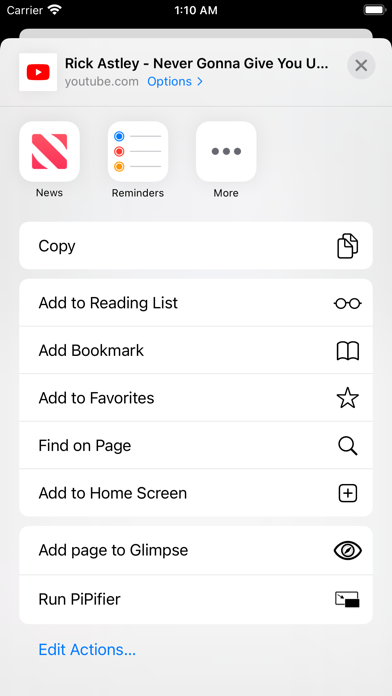
About
Why Install PiPifier on Safari?
Enable native Safari Picture-in-Picture for any web video.
Directly hooks into HTML5 Video MediaSource without re-encoding video frames
Unlocks native macOS / iOS Picture-in-Picture (PiP) even on restricted sites
Provides instant keyboard shortcuts for fine-grained playback speed (0.25x - 4.0x)
Does This Extension Fit Your Workflow?
✓ Best Suited For
Binge-watchers, online course learners, and YouTube power users who want seamless floating PiP and fine playback control.
⚠️ Who Might Skip
Users exclusively watching DRM-protected proprietary Silverlight or old Flash video players.
What's New in Version v1.3
What Real Users Say About PiPifier
Authentic feedback and real-world ratings from Mac & iOS users
Not functional for me
"Neither the extensions nor the share method would allow me to enable pipifier! Was really hoping this would be good since i'd heard so many good things about"
So good!!
"This is absolutely PERFECT!! I can play Roblox on it, and listen to music with a tap!! I love this, now I can sing more."
Works Well
"Easy to use and works just as expected! Would like an option to "auto" PiP if possible - popping a video out into pip automatically when changing tabs or leaving safari."
Needs iOS 12 support..
"Not sure why but iOS 12 support was pulled, and they don’t let you download the old version anymore on iOS 12 either. It was really useful for those old devices where the YouTube app no longer works."
Got Questions About PiPifier?
Q.Is PiPifier free, or does it require a subscription?
PiPifier is 100% free to download on the Apple App Store without predatory weekly subscription traps. You can install and use it across your Mac and iPhone Safari browsers.
Q.How do I enable PiPifier in macOS and iOS Safari?
On Mac (macOS): After downloading from the Mac App Store, open the application once, then launch Safari -> click "Settings" (or Preferences) in the menu bar -> select the "Extensions" tab -> locate "PiPifier" and check the box to enable it. On iPhone/iPad (iOS): Go to iOS "Settings" -> tap "Safari" -> tap "Extensions" -> select "PiPifier" and toggle it ON.
Q.Can I watch YouTube or Bilibili in PiP without paying for premium subscriptions?
Yes. The extension triggers Safari native webkitSetPresentationMode("picture-in-picture") directly on the video element, bypassing artificial soft-locks enforced by web players.
Q.Does speed controller distort audio pitch when watching at 2.0x or 3.0x?
No. WebKit includes built-in real-time pitch preservation (SoundTouch algorithm). Voices remain natural and easily comprehensible even when speeding through technical tutorials.
Maximize Your Productivity on macOS & iOS
Hold the Command key while dragging the Picture-in-Picture window on macOS to snap it anywhere on your desktop freely.
PiPifier Quality & Health Audit
Evaluated across verified App Store reputation, pricing ethics, update cadence, and native footprint.
★ 4.4 / 5.0 with 324 verified reviews
Open Source (Community Verified)
v1.3 - Actively Maintained
1.5 MB package size, Standard WebExtension
Technical Specifications & App Store Metadata
Help fellow Mac & iOS users discover clean tools
Copy the pitch or share directly with one click to social media.
Looking for a Safari alternative to PiPifier?
PiPifier is the premier 1-to-1 Safari replacement for Chrome's PiPifier, saving battery and system RAM.
Undecided about PiPifier? See how it compares with its biggest rivals
Detailed breakdown of system memory, lifetime pricing, and real App Store customer feedback.
Similar Safari Extensions You Might Like
Explore more verified tools in the video category

Replaces custom video players on the web with native Safari video playback.

Automatically skip YouTube video sponsors, intros, and subscription nags.

Replaces the YouTube player with a clean, native HTML5 video player.