Turn Off the Lights for Safari
🧭 WebKit Video Stream & PiP Optimizer

Turn Off the Lights for Safari

Developed by Stefan Van Damme · Version 4.7.2 (35.8 MB)

🏆Quality Score: 78/100 (B)
Actively Maintained
★ 4.1(59 ratings)
🇨🇳 Supports Chinese🖥️ macOS 18.0+📱 iOS / iPadOS✨ Universal Purchase💻 Open Source
Pricing
100% Free
Free Download
🌐 Developer Website↗

Screenshots & Interface

Turn Off the Lights for Safari interface screenshot 1Turn Off the Lights for Safari interface screenshot 2Turn Off the Lights for Safari interface screenshot 3Turn Off the Lights for Safari interface screenshot 4Turn Off the Lights for Safari interface screenshot 5Turn Off the Lights for Safari interface screenshot 6Turn Off the Lights for Safari interface screenshot 7

About

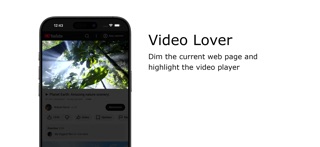
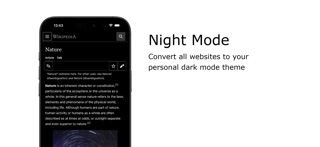
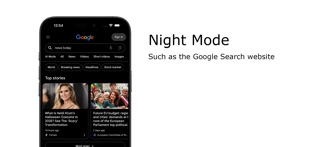
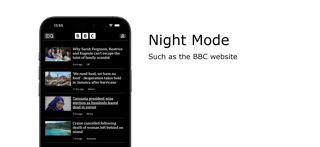
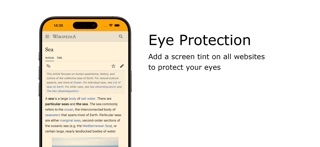
Immerse yourself in a cinematic atmosphere while watching videos online with Turn Off the Lights. This powerful browser extension dims everything on the web page except for the video you are watching, bringing your focus to the content that matters most. Turn Off the Lights browser extension has also been featured on several popular websites, including Lifehacker, CNET, ZDNet, BuzzFeed, and PC World. With its growing popularity and positive feedback, it is no surprise that the Turn Off the Lights browser extension has become one of the most popular and trusted browser extensions in the market. Please share your feedback, suggestions, and thoughts with us https://www.turnoffthelights.com/support Browser extension features: ◆ Turn the lights back on by clicking on the black layer ◆ Supports multiple video sites: YouTube, Dailymotion, Vimeo, Twitch, and more ◆ Customize your YouTube experience: - Auto HD: Set videos to play in HD automatically, with options ranging from highres > 8K > 5K > 4K > 1080p > 720p > 480p > 360p > 240p > 144p > default - Auto Wide: Automatically plays videos in the widest mode - 60 FPS Block: Disable YouTube 60 FPS for Auto HD 30 FPS video quality ◆ Easter Eggs: Shortcut key: T -> Experience a real movie theater feeling ◆ Darken the screen when the user clicks on the play button ◆ Toggle fade in and fade out effects ◆ Customize colors ◆ Enable Multimedia Detection ◆ Display Dimness Level Bar ◆ Eye Protection for nighttime browsing, with a whitelist/blacklist filter ◆ Atmosphere lighting to create a glow around the video player ◆ Show the dark layer on top of the window ◆ Shortcut Keys: Ctrl + Shift + L: Toggle the lights Alt + F8: Restore default opacity value Alt + F9: Save current opacity value Alt + F10: Enable/disable the Eye Protection feature Alt + (Arrow Up): Increase opacity Alt + (Arrow Down): Decrease opacity Alt + *: Toggle lights on all open tabs ◆ Mouse Wheel Volume Control for each HTML5 video player ◆ Apply filters to the current HTML5 video player (grayscale, sepia, invert, contrast, saturate, hue rotation, brightness) ◆ Audio Visualization effect on top of the current HTML5 video (Blocks, Frequency, and Music Tunnel) ◆ Loop the current HTML5 video player ◆ Night Mode switch to toggle YouTube in black or white theme, with whitelist/blacklist filter - Timestamp: Activate Night Mode within the chosen time - Blackout: Dim web page and activate Night Mode ◆ Stop YouTube and HTML5 videos from automatically playing ◆ And more… Do not forget to Like & Follow Us: Facebook https://www.facebook.com/turnoffthelight X https://www.x.com/TurnOfftheLight Pinterest https://www.pinterest.com/turnoffthelight Instagram https://www.instagram.com/turnoffthelights YouTube https://www.youtube.com/@turnoffthelights Project Information: https://www.turnoffthelights.com/browser Note: YouTube is a trademark of Google Inc. Use of this trademark is subject to Google Permissions.
⚡ Key Performance & WebKit Highlights

Why Install Turn Off the Lights for Safari on Safari?

Dims the whole web page to focus comfortably on the video you are watching.

1

Directly hooks into HTML5 Video MediaSource without re-encoding video frames

2

Unlocks native macOS / iOS Picture-in-Picture (PiP) even on restricted sites

3

Provides instant keyboard shortcuts for fine-grained playback speed (0.25x - 4.0x)

🎯 Target Audience & Use Cases

Does This Extension Fit Your Workflow?

✓ Best Suited For

Binge-watchers, online course learners, and YouTube power users who want seamless floating PiP and fine playback control.

💎Completely free to install

⚠️ Who Might Skip

Users exclusively watching DRM-protected proprietary Silverlight or old Flash video players.

💡Consider exploring other alternatives if your workflow demands these features
🚀

What's New in Version v4.7.2

Official Release Notes
+ Bugs and performance fixes. If you like Turn Off the Lights, the best way you can support the app is by telling others about it! And please do not forget to rate the app to 5 stars on the App Store that to support my free and Open-Source work. If you have any feedback or questions, we’d love to hear from you! Turn Off the Lights offers free support. You can reach us on Facebook TurnOfftheLight, or on X at @turnoffthelight. You can also read our User Guides or browse our FAQs on https://www.turnoffthelights.com/support.
⭐️ Verified App Store Reviews

What Real Users Say About Turn Off the Lights for Safari

Authentic feedback and real-world ratings from Mac & iOS users

★★★★★
2026-10-09

T

"T"

by sdlk fjwaefjow2v4.7.2
★★★★★
2026-10-02

Love this extension

"This extension darkens the safari web browser and I love it because it helps with the brightness that hurts my eyes."

by amandared2230v4.7.2
★☆☆☆☆
2026-08-28

화면 전체를 어둡게 할 뿐 전혀 쓸모가 없습니다.

"사파리 화면에 검정색 어두운 필름을 올려둔 것 처럼 작동합니다. 게다가 화면을 어디든 클릭하면 다시 원상태로 돌아옵니다. 이런걸 왜 만들었는지 모르겠네요."

by Daizo29v4.6.6
★☆☆☆☆
2026-08-14

Now Broken?

"Used to work really well, but maybe the new iOS 26.6 broke it…no longer shows up in my settings (in Safari extensions) for me to enable/disable. Hope they fix it soon so I can enjoy online stories again."

by MonkeyButt.Lovev4.6.6
💡 Frequently Asked Questions

Got Questions About Turn Off the Lights for Safari?

Q.Is Turn Off the Lights for Safari free, or does it require a subscription?

Turn Off the Lights for Safari is 100% free to download on the Apple App Store without predatory weekly subscription traps. You can install and use it across your Mac and iPhone Safari browsers.

Q.How do I enable Turn Off the Lights for Safari in macOS and iOS Safari?

On Mac (macOS): After downloading from the Mac App Store, open the application once, then launch Safari -> click "Settings" (or Preferences) in the menu bar -> select the "Extensions" tab -> locate "Turn Off the Lights for Safari" and check the box to enable it. On iPhone/iPad (iOS): Go to iOS "Settings" -> tap "Safari" -> tap "Extensions" -> select "Turn Off the Lights for Safari" and toggle it ON.

Q.Can I watch YouTube or Bilibili in PiP without paying for premium subscriptions?

Yes. The extension triggers Safari native webkitSetPresentationMode("picture-in-picture") directly on the video element, bypassing artificial soft-locks enforced by web players.

Q.Does speed controller distort audio pitch when watching at 2.0x or 3.0x?

No. WebKit includes built-in real-time pitch preservation (SoundTouch algorithm). Voices remain natural and easily comprehensible even when speeding through technical tutorials.

🍎 Safari Power User Tips

Maximize Your Productivity on macOS & iOS

Hold the Command key while dragging the Picture-in-Picture window on macOS to snap it anywhere on your desktop freely.

🛡️ Extension Quality Score & Health Audit

Turn Off the Lights for Safari Quality & Health Audit

Evaluated across verified App Store reputation, pricing ethics, update cadence, and native footprint.

Health Score
78/100
Grade B
Actively Maintained
User Reputation20 / 35

★ 4.1 / 5.0 with 59 verified reviews

Pricing Ethics30 / 30

Open Source (Community Verified)

Maintenance & Updates20 / 20

v4.7.2 - Actively Maintained

Native Footprint & Quality8 / 15

35.8 MB package size, Official developer site

⚖️ Scores are algorithmically computed based on Apple verified metrics with zero sponsored bias.v4.7.2 Audit

Technical Specifications & App Store Metadata

Software TypeSafari Web Extension
DeveloperStefan Van Damme
Latest Version4.7.2
Package Size35.8 MB
Minimum OS RequirementmacOS 18.0+ / iOS 15+
Language SupportChinese, English & more
Content Rating17+
Official Rating★ 4.1 / 5.0
Pricing Modelfree
Open SourceYes (Open Source)
🚀 Love this extension? Spread the word!

Help fellow Mac & iOS users discover clean tools

Copy the pitch or share directly with one click to social media.

𝕏Post to X
Chrome Migration Equivalent

Looking for a Safari alternative to Turn Off the Lights?

Turn Off the Lights for Safari is the premier 1-to-1 Safari replacement for Chrome's Turn Off the Lights, saving battery and system RAM.

Explore Chrome Alternatives →

Similar Safari Extensions You Might Like

Explore more verified tools in the video category

View all in category →
Baking Soda - Tube Cleaner

by And a Dinosaur

★ 4.5·100 ratings·A+ · 92

Replaces custom video players on the web with native Safari video playback.

$1.99 One-Time
MaciOS
SponsorBlock for Safari

by Ajay Ramachandran

★ 4.4·81 ratings·A · 86

Automatically skip YouTube video sponsors, intros, and subscription nags.
$0.99 One-TimeOpen Source
MaciOS
Vinegar - Tube Cleaner

by And a Dinosaur

★ 4.2·762 ratings·A · 87

Replaces the YouTube player with a clean, native HTML5 video player.

$1.99 One-Time
MaciOS