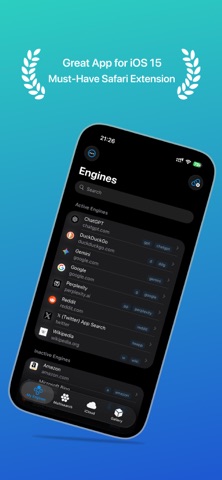
xSearch for Safari
🧭 Distraction-Free Focus & Social Feed Cleaner

xSearch for Safari

Developed by 磊 汪 · Version 5.1.0 (18.8 MB)

🏆Quality Score: 84/100 (A)
Actively Maintained
★ 4.5(234 ratings)
🇨🇳 Supports Chinese🖥️ macOS 15.0+📱 iOS / iPadOS✨ Universal Purchase
Pricing
$2.99
One-Time Purchase (No Subscription)

Screenshots & Interface

xSearch for Safari interface screenshot 1xSearch for Safari interface screenshot 2xSearch for Safari interface screenshot 3xSearch for Safari interface screenshot 4xSearch for Safari interface screenshot 5xSearch for Safari interface screenshot 6xSearch for Safari interface screenshot 7xSearch for Safari interface screenshot 8xSearch for Safari interface screenshot 9xSearch for Safari interface screenshot 10

About

# Featured in the App Store across 63 countries & regions # Featured on Dailytekk's YouTube channel: "BEST iPad Browser Extensions (Apps)" # Featured on Christopher Lawley's YouTube channel: "Must Have Safari Extension for iOS/iPadOS 15" # Featured on MacStories's YouTube channel: "Safari Extensions for iPhone and iPad" Upgrade your Safari browsing with xSearch, the all-in-one search tool for iOS, iPadOS, and macOS with just one purchase. xSearch lets you instantly switch between multiple search engines and even search directly from Spotlight, making your browsing faster and more efficient. For example, type "g apple" to search for "apple" using Google, or "ddg apple" to search with DuckDuckGo. Privacy is a top priority: xSearch requests only the permissions it needs. On iOS 17, iPadOS
⚡ Key Performance & WebKit Highlights

Why Install xSearch for Safari on Safari?

Switch between search engines using Alfred-style short prefixes in address bar.

1

Selectively hides algorithmic recommendations, trending hashtags, and clickbait reels

2

Restores pure chronological timelines on X (Twitter), Reddit, and YouTube

3

Boosts daily cognitive focus by eliminating endless scrolling addiction traps

🎯 Target Audience & Use Cases

Does This Extension Fit Your Workflow?

✓ Best Suited For

Knowledge workers, writers, and students who want to use social media for research without getting trapped in endless feeds.

💎One-time purchase for $2.99, lifetime access

⚠️ Who Might Skip

Users who love exploring algorithmic viral videos and trending celebrity gossip.

💡Consider exploring other alternatives if your workflow demands these features
🚀

What's New in Version v5.1.0

Official Release Notes
xSearch 5.0 - Added full support for iPhone Duo. - Updated for the latest operating systems with improved compatibility and platform-specific refinements. - Improved tab switching with a smoother, more native navigation experience. - Fixed legacy navigation issues where engine rows could stop responding after rotating between landscape and portrait. - Refined sidebar layouts and navigation icons. - Updated list and split-view backgrounds for a cleaner, more seamless appearance. - Redesigned empty states and iCloud status views with modern action buttons. - Redesigned the Safari extension setup tutorial with clearer permission instructions, plus a new popup guide with usage examples. - Improved Safari extension setup links across iOS versions. - Added external links and Shortcuts for search, settings, engines, and Multisearch. - Added a more capable JSON editor search experience with a sticky search bar, improved navigation controls, better keyboard behavior, and improved iPad presentation. - Added a loading indicator when opening the JSON editor. - Added hardware keyboard shortcuts for quickly focusing search fields and adding search engines. - Expanded keyboard shortcuts for tabs and engine actions on iPhone and iPad. - Improved Shortcuts engine suggestions with correct ordering and clearer icons. - Added validation for Shortcut Prefix and Shortcut Bypass values, including clear alerts when multiple characters are entered or both shortcuts conflict, and fixed toggles remaining enabled when their key is empty. - Enhanced Multisearch UI and process workflow, with live shortcut synchronization when engines are updated. - Updated the preset search engine gallery, adding new popular engines and removing deprecated ones with updated favicons and URLs. - Improved engine detail previews and popover interactions across iPhone and iPad. - Improved engine editing with clearer icon validation, smoother focus, and reliable URL input. - Improved search performance and responsiveness when rapidly typing or clearing search queries, with smoother engine-list search states. - Improved Gallery and Multisearch loading performance. - Improved iCloud synchronization reliability and fixed profile-switching issues. - Added iCloud conflict resolution for JSON profiles, so you can choose which version to keep before editing. - Improved iCloud conflict handling during simultaneous refreshes and checks. - Improved iCloud reliability when profiles are temporarily unavailable, preserving local engines and automatically resuming sync when the profile returns. - Added clearer iCloud profile status and conflict feedback. - Fixed an issue where iCloud synchronization did not update automatically when enabling iCloud while the app was running. - Fixed toast and notification presentation issues for a more reliable feedback experience. - Resolved Share Extension settings observer issues for seamless background updates. - Improved Share Extension engine selection with clearer tap guidance, preserved custom ordering, and a notice for links that may open directly in other apps. - Added redesigned Share Extension empty states with an option to open xSearch. - Improved sharing and export feedback with clearer error messages and a more native sharing experience. - Fixed keyboard shortcut routing (Command + N) across tabs. - Improved custom domain validation and search compatibility in Safari. - Optimized keyboard behavior by disabling autocorrection for custom domains and preserving capitalization when renaming profiles. - Enhanced VoiceOver accessibility support across all screens and improved visual feedback for empty states. - Added better support for Reduce Motion across lists, animations, and notifications. - Improved accessibility labels for engine actions, profile actions, and editing controls. - Added under-the-hood performance, memory, and stability improvements.
⭐️ Verified App Store Reviews

What Real Users Say About xSearch for Safari

Authentic feedback and real-world ratings from Mac & iOS users

★★★★★
2026-07-08

Works great and developer is very helpful

"I’ve been using it for a while and it’s been working great. It works just how I wanted it to. I had an issue with redirects and the dev was fast in his response and promptly fixed the issue. Highly recommend"

by ItsSoEasyToBeNicev4.1.3
★★★★★
2026-06-28

A1

"I don’t know how I ever managed without this extension. Excellent in every way. Clean, minimalist , easy to use."

by kayemmev4.1.1
★★★★☆
2026-06-21

Don’t trap The snake

"Classic title (Lol)"

by (fre(F)onv4.1.1
★★★★☆
2026-06-17

needs a youtube how to video

"When I downloaded this I expected it to work like “context search menu”. I looked online for how to videos but couldn’t find any. This is my first time using extensions on safari and didn’t realize there was an app. I think a how to video would have made this a lot easier."

by Accents1v4.1.1
💡 Frequently Asked Questions

Got Questions About xSearch for Safari?

Q.Is xSearch for Safari free, or does it require a subscription?

xSearch for Safari is available as an honest One-Time Purchase for $2.99. Buy once to unlock full lifetime access, completely avoiding recurring subscription charges.

Q.How do I enable xSearch for Safari in macOS and iOS Safari?

On Mac (macOS): After downloading from the Mac App Store, open the application once, then launch Safari -> click "Settings" (or Preferences) in the menu bar -> select the "Extensions" tab -> locate "xSearch for Safari" and check the box to enable it. On iPhone/iPad (iOS): Go to iOS "Settings" -> tap "Safari" -> tap "Extensions" -> select "xSearch for Safari" and toggle it ON.

Q.Will this cause my social media account to be shadowbanned or flagged?

Absolutely not. The extension operates strictly client-side on the rendered HTML DOM in your browser. It does not send unauthorized automated API requests or simulate bot clicks.

Q.Can I still search for specific keywords and view direct messages?

Yes. Core utilities such as Direct Messages (DMs), notifications, profile viewing, and targeted search bars remain 100% accessible and unaffected.

🍎 Safari Power User Tips

Maximize Your Productivity on macOS & iOS

Enable grayscale mode or scheduled blocking during deep work blocks (e.g., 9:00 AM - 12:00 PM) for peak productivity.

🛡️ Extension Quality Score & Health Audit

xSearch for Safari Quality & Health Audit

Evaluated across verified App Store reputation, pricing ethics, update cadence, and native footprint.

Health Score
84/100
Grade A
Actively Maintained
User Reputation30 / 35

★ 4.5 / 5.0 with 234 verified reviews

Pricing Ethics27 / 30

One-Time Purchase ($2.99) - Zero Subscriptions

Maintenance & Updates20 / 20

v5.1.0 - Actively Maintained

Native Footprint & Quality7 / 15

18.8 MB package size, Standard WebExtension

⚖️ Scores are algorithmically computed based on Apple verified metrics with zero sponsored bias.v5.1.0 Audit

Technical Specifications & App Store Metadata

Software TypeSafari Web Extension
Developer磊 汪
Latest Version5.1.0
Package Size18.8 MB
Minimum OS RequirementmacOS 15.0+ / iOS 15+
Language SupportChinese, English & more
Content Rating17+
Official Rating★ 4.5 / 5.0
Pricing Modelone-time
Open SourceNo (Proprietary)
🚀 Love this extension? Spread the word!

Help fellow Mac & iOS users discover clean tools

Copy the pitch or share directly with one click to social media.

𝕏Post to X
Chrome Migration Equivalent

Looking for a Safari alternative to xSearch?

xSearch for Safari is the premier 1-to-1 Safari replacement for Chrome's xSearch, saving battery and system RAM.

Explore Chrome Alternatives →

Similar Safari Extensions You Might Like

Explore more verified tools in the social category

View all in category →
Sink It for Reddit

by Tony Sundharam

★ 4.7·949 ratings·A+ · 91

Declutters Reddit on Safari by removing app nag banners, promoted posts, and bloat.

Free
MaciOS
RedirectWeb: Smart URL Router

by Manabu Nakazawa

★ 4.7·75 ratings·A · 84

Smart customizable URL redirects for privacy and clean links.

Free
MaciOS
Cleanpath - Quit Lust & Urges

by Maxima Apps

★ 4.5·2037 ratings·A · 86

Block NSFW adult content and maintain digital wellness on the web.

Free
MaciOS