Darker - Dark Mode for Safari
🧭 油猴用户脚本与 DOM 深度定制

Darker - Dark Mode for Safari

开发商: 国辉 满 · Version 1.9 (7.4 MB)

🏆综合品质健康分: 91/100 (A+)
积极维护中
★ 4.2(1325 条评分)
🇨🇳 支持简体中文🖥️ macOS 15.0+📱 iOS / iPadOS✨ 一次购买 多端通用
定价方式
完全免费
完全免费无套路
🌐 官方网站直达↗

应用截图与界面预览

Darker - Dark Mode for Safari interface screenshot 1Darker - Dark Mode for Safari interface screenshot 2Darker - Dark Mode for Safari interface screenshot 3

扩展介绍与功能详解

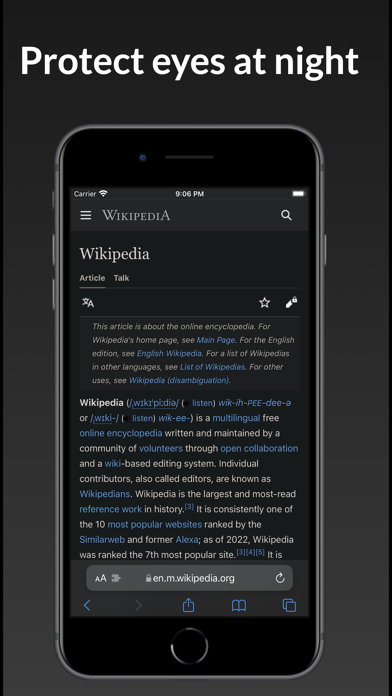
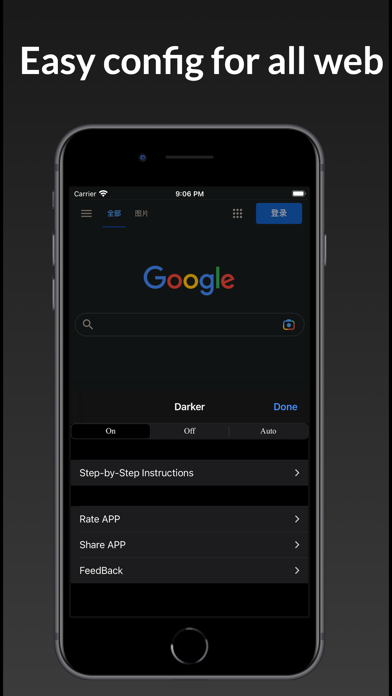
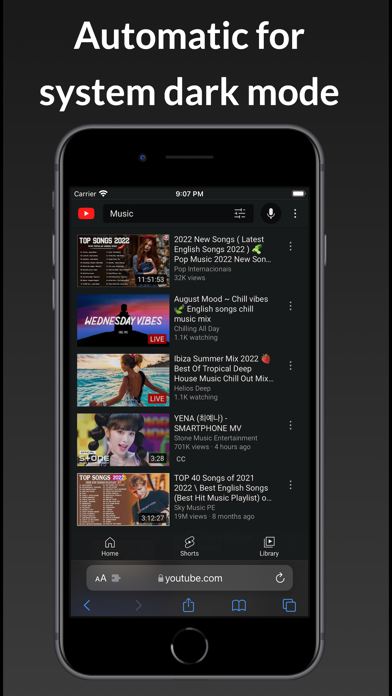
Darker is a Safari extension that automatically adds a dark mode to every website you visit. It makes browsing the web at night so much better. With Darker, you won’t be blinded by bright websites ever again. The main features are: - apply dark mode to various web sites - Enable night shift - yellow tint that helps your eyes - Make web pages easier to read - Read comfortable in night - Save battery power - Customizable background color - Customizable background opacity with a slider Privacy Policy: • The Darker extension requires access to the websites you visit to analyze the existing style of the page and to override it with Darker's dark style. • Darker never collects your browsing data. The only data Darker ‘collects’ are your settings, and those will never leave your device. -- HOW TO SETUP -- 1. Please open the app and click the button on the welcome screen. This will take you to the Settings screen. Then tap Safari (for iPad, check left pane) > Extensions > Darker, then tap the switch to turn it on. 2: On the same screen, tap All Websites > Allow to grant permission to run Darker's extension on Safari on all websites. Now you're all set! Note: You can tap the "Manage Extensions" icon in your Safari address bar to access the Darker settings. Note: Safari may display a notice saying that the extension can read your sensitive information and browsing history. This is a general reminder that appears with every extension. Darker will never read or collect any of your personal information such as passwords or credit card numbers. It's completely safe to use. You have my word! The extension will work on Safari for iOS/iPadOS version 15.0 and above.
⚡ 架构性能与 WebKit 原生优势

为什么 Darker - Dark Mode for Safari 值得在 Safari 上使用?

智能识别明暗色彩的轻量网页护眼暗黑模式扩展,支持色温与亮度滑动调节。

1

完整兼容主流 GM_* 高阶接口(GM_xmlhttpRequest、GM_setValue、GM_registerMenuCommand)

2

支持直接从 Greasy Fork 与 GitHub 仓库一键安装、自动检查并更新用户脚本

3

完美支持通过苹果 iCloud 钥匙串在 Mac、iPhone 与 iPad 之间自动同步已安装脚本

🎯 适用人群与典型场景

此扩展适合您的日常工作流吗?

✓ 最适合人群

喜欢折腾客制化、需要解除网页复制限制、美化学术/技术站点排版或实现网页自动化操作的极客玩家。

💎完全免费,随心体验零门槛

⚠️ 可能不适合

希望完全“开箱即用”、不愿意接触任何脚本安装或权限授权的轻度用户。

💡如果您的需求重度依赖以上场景,建议探索同类其他工具
🚀

最新版本更新日志 v1.9

Official Release Notes
This new version includes: - Improved dark mode compatibility across more websites. - Fixed bugs and improved stability.
⭐️ App Store 真实果粉评价

真实果粉对 Darker - Dark Mode for Safari 的评价

来自 Apple App Store 真实用户的体验评测与星级打分

★★☆☆☆
2026-11-02

Full of manipulative ads and not actually free

"Darker is marketed as a free version of Noir. In reality it’s stuffed with Temu ads with dark patterns like fake close buttons that actually just click the ad. Also, it’s $2, so there is literally no reason to use this instead of Noir. It’s sad that Apple used to block apps like this, but now they just let them through."

by meowapple1v1.9
★★★★★
2026-10-26

My eyes don’t burn anymore

"This extension is a life-saver for my college classes in D2L, I’m constantly on there. I also love the options they have for the extension while in use. You’re able to turn it off for different websites, completely turn it off, set it to automatic, or turn it back on for all websites again. Super useful!"

by repetitivedayv1.9
★★★★★
2026-10-25

life saver

"had to switch to safari due to issues w chrome and other browsers, couldnt find a free dark mode extension on here, this works great so far"

by yesilove13dv1.9
★★★★★
2026-10-24

Great and Reliable

"This is very reliable and works great on all websites. I highly recommend"

by Saleh.s.Matarv1.9
💡 高频答疑与技术细节

关于 Darker - Dark Mode for Safari 的使用问答

Q.Darker - Dark Mode for Safari 是免费的还是需要订阅?有没有隐藏扣费?

Darker - Dark Mode for Safari 在 Apple App Store 上是 100% 完全免费下载的,且无需任何隐藏按周付费订阅。您可以在 Mac 和 iPhone 的 Safari 浏览器上放心使用。

Q.如何在 Mac 和 iPhone 的 Safari 浏览器中启用 Darker - Dark Mode for Safari?

在 Mac 上:从 Mac App Store 下载后,启动一次该应用,随后打开 Safari 浏览器 -> 顶部菜单选择【设置】(Settings) -> 点击【扩展】(Extensions) 标签页 -> 找到“Darker - Dark Mode for Safari”并勾选复选框即可启用。 在 iPhone/iPad 上:打开系统【设置】 -> 向下滑动点击【Safari 浏览器】 -> 选择【扩展】 -> 点击“Darker - Dark Mode for Safari”并将其开关切换为【开启】。

Q.Greasy Fork 和 GitHub 上的油猴脚本能在 iPhone 和 iPad 的 Safari 上运行吗?

完全可以!现代 Safari 扩展利用 WebKit 的 Content World 独立沙箱机制,使得 iOS/iPadOS 上的 Safari 同样能无障碍执行复杂的用户脚本,移动端体验媲美桌面端。

Q.同时开启多个油猴脚本会导致网页滑动变卡吗?

通常不会。Safari 会对脚本执行上下文进行严格沙箱隔离。只要脚本自身没有死循环,WebKit 优秀的 JS 编译器(JSCore)能保证数十个脚本并行秒开。

🍎 Safari 进阶使用小技巧

让此扩展在苹果生态发挥 100% 潜能

安装第三方脚本时,注意检查其是否申请了网络跨域权限(GM_xmlhttpRequest),保障个人账户安全。

🛡️ 扩展品质与健康度评分卡

Darker - Dark Mode for Safari 综合健康度报告

基于 App Store 真实口碑、诚实买断定价、维护活跃度与原生轻量工程 4 大核心维度量化评估。

Health Score
91/100
评级 A+
积极维护中
真实口碑与公信力30 / 35

官方评分 ★ 4.2 (1325 条真实打分)

定价友好度与商业伦理28 / 30

100% 完全免费

维护活跃度与更新频次20 / 20

当前版本 v1.9 (积极维护中)

原生轻量度与工程规范13 / 15

7.4 MB 轻量原生包体, 具备独立官网与支持

⚖️ 评分由算法基于 Apple 官方数据自动生成,无商业买通或赞助加权。v1.9 Audit

技术规格与官方合规档案

软件类型Safari Web Extension
开发者国辉 满
当前版本1.9
安装包体积7.4 MB
最低系统要求macOS 15.0+ / iOS 15+
界面语言支持中文等多国语言
年龄分级4+
官方评分★ 4.2 / 5.0
买断/定价free
开源状态No (Proprietary)
🚀 喜欢这款扩展?分享给身边好友

帮助更多果粉告别流氓订阅陷阱

一键复制推荐卡片文案,或直接分享至 X (Twitter)、微博等社交网络。

Chrome 迁移指南

正在寻找 Midnight Lizard 的 Safari 平替?

Darker - Dark Mode for Safari 是 Chrome 经典扩展 Midnight Lizard 在苹果 Safari 上的最佳原生替代方案,无需忍受 Chrome 的严重耗电与内存占用。

查看全部平替清单 →

类似的高评分 Safari 扩展

更多属于 tweaks 分类下的经过验证的精选工具

浏览分类全部 →
Amplosion: Redirect AMP Links

by Christian Selig

★ 4.9·1515 条评分·A · 89

Apollo 作者神作:全自动将让人头痛的 Google AMP 链接重定向回原始网页。

$1.99 买断开源
MaciOS
Stay for Safari

by 寅 沈

★ 4.7·2120 条评分·B · 76

专为 iOS 与 macOS Safari 深度定制的现代化油猴脚本管理器与同步工具。

免费增值
MaciOS
StopTheMadness Pro

by Jeff Johnson

★ 4.7·206 条评分·A · 87

反流氓网页神器:彻底解禁复制粘贴、恢复右键菜单、禁止按键劫持与追踪。

$14.99 买断
MaciOS