StopTheScript
开发商: Jeff Johnson · Version 4.0 (3.7 MB)
应用截图与界面预览


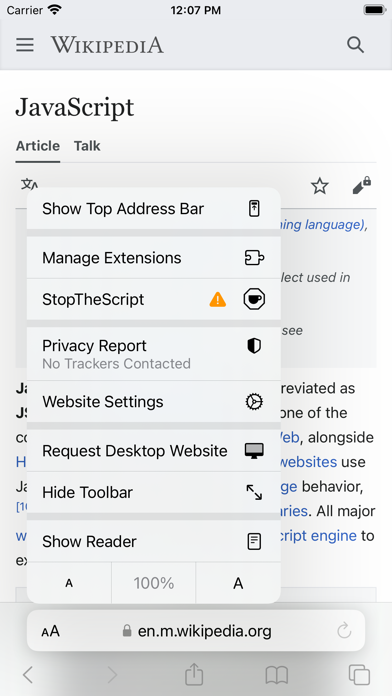
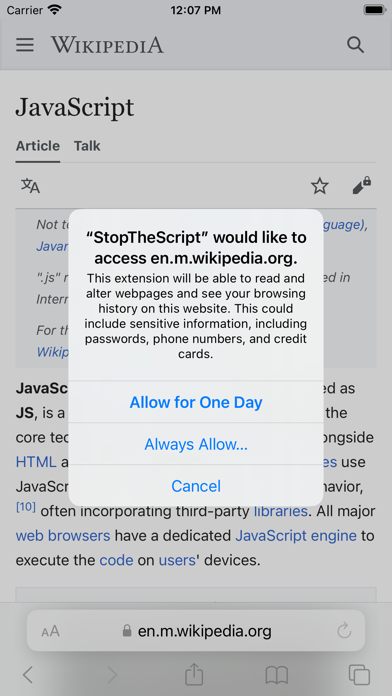

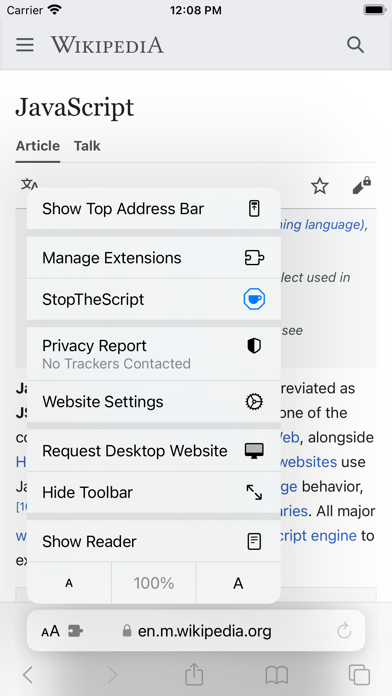


扩展介绍与功能详解
为什么 StopTheScript 值得在 Safari 上使用?
StopTheMadness 开发者出品,精准按域名管理 JavaScript 脚本执行权限。
深度调用 macOS Touch ID 指纹识别、Apple Watch 震动解锁与 Secure Enclave 安全芯片
与 Safari 原生 Web Inspector 检查器深度融合,极速分析网络请求与前端 DOM 树
零隐私遥测,所有凭据与密钥加密存储于本地钥匙串,绝不静默上传至远程第三方
此扩展适合您的日常工作流吗?
✓ 最适合人群
前端工程师、全栈开发者以及对个人密码凭据安全有严苛要求的数字游民与专业人士。
⚠️ 可能不适合
仅需要浏览网页或看视频娱乐、不需要任何密码填充或开发调试能力的普通浏览者。
最新版本更新日志 v4.0
真实果粉对 StopTheScript 的评价
来自 Apple App Store 真实用户的体验评测与星级打分
Must Have Extension
"I’m questioning the negative reviewers. It’s a fantastic app. IYKYK. Does exactly what you need it to do. Tested on a few articles and it works perfectly. Thank you!"
Does what it says, but what does is stupid
"Ok, my fault. I actually couldn’t believe that anyone would write such a stupid extension, so I assumed that the author worded the description poorly. Joke’s on me. 1. Why would there be no ability to whitelist certain websites? — this is different from enabling the <noscript> tags. Enabling noscript tags still breaks minor sites like Google.com. 2. Why would the choice be all or nothing JavaScript. Why not work like NoScript on every other platform and give a choice of scripts to run vs. block, and allow some to be global and some only for the given website. As designed and implemented, it works, but is useless. As it is currently configured, it is worth about 50 cents. Write a shortcut that turns JavaScript on and off in settings and it would be equally useful. Avoid this until it’s updated to have relevance."
Not functioning
"I purchased, installed, set as extension in safari and still nothing."
If you are a NoScript user, this app is for you!
"For those that are accustomed to the benefits of NoScript on a PC when using a full web browser, this app is the next best thing. Well done!"
关于 StopTheScript 的使用问答
Q.StopTheScript 是免费的还是需要订阅?有没有隐藏扣费?
StopTheScript 采用备受苹果用户推崇的“一次性买断制(One-Time Purchase)”,官方价格为 $5.99。购买后永久解锁所有高级功能,杜绝每周 $4.99 类型的流氓强制扣费陷阱。
Q.如何在 Mac 和 iPhone 的 Safari 浏览器中启用 StopTheScript?
在 Mac 上:从 Mac App Store 下载后,启动一次该应用,随后打开 Safari 浏览器 -> 顶部菜单选择【设置】(Settings) -> 点击【扩展】(Extensions) 标签页 -> 找到“StopTheScript”并勾选复选框即可启用。 在 iPhone/iPad 上:打开系统【设置】 -> 向下滑动点击【Safari 浏览器】 -> 选择【扩展】 -> 点击“StopTheScript”并将其开关切换为【开启】。
Q.该工具支持 Mac 的 Touch ID 指纹和 Apple Watch 双击解锁吗?
支持。macOS 原生扩展 API 允许直接对接系统 Biometrics 生物识别接口,轻触 Touch ID 或双击手表侧键即可瞬间完成解锁。
Q.该扩展能否正常在本地开发环境(如 localhost 或 127.0.0.1)下正常工作?
可以。只需在扩展设置中赋予该域名访问权限,即可无缝对本地 Vite / Next.js / React 开发服务进行拦截与调试。
让此扩展在苹果生态发挥 100% 潜能
在 Mac 键盘上按下 Option + Command + I 即可秒开 Safari 审查元素控制台,在专属面板中调试扩展数据。
StopTheScript 综合健康度报告
基于 App Store 真实口碑、诚实买断定价、维护活跃度与原生轻量工程 4 大核心维度量化评估。
官方评分 ★ 4.5 (31 条真实打分)
诚实买断制 ($5.99) 拒绝按周扣费
当前版本 v4.0 (积极维护中)
3.7 MB 轻量原生包体, 具备独立官网与支持
技术规格与官方合规档案
正在寻找 StopTheScript 的 Safari 平替?
StopTheScript 是 Chrome 经典扩展 StopTheScript 在苹果 Safari 上的最佳原生替代方案,无需忍受 Chrome 的严重耗电与内存占用。
类似的高评分 Safari 扩展
更多属于 devtools 分类下的经过验证的精选工具

手机端调试神作:把桌面级网页控制台、网络面板与审查元素带到 iPhone/iPad。